The language chips
Most people study one language at a time, even when Parseh holds several. So every page that lists things has a row of language chips at its top, and picking one chip picks that language everywhere.
1. Where they are#
- The hub
- — in both layouts. In the Mobile layout the chips sit in one line that scrolls sideways and always brings the picked chip into view; opened with a mouse, the line wraps instead, so nothing needs a swipe to reach.
- The book library
- —
/books/, and the mobile interface’s shelf, whose chips sit in one line as the mobile hub’s do. - The videos
- —
/youtube/. - The studio’s library
- —
/studio/. - The exercise decks
- —
/exercises/.
2. What a row shows#
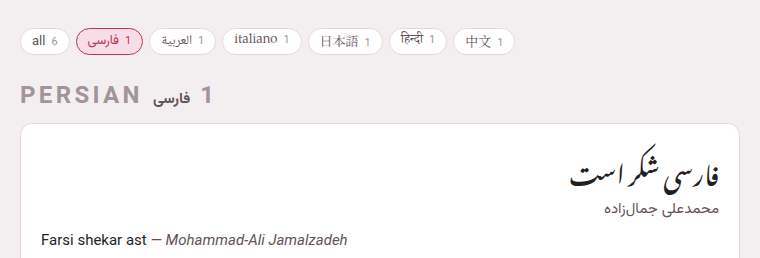
all comes first, with the number of everything on the page. Then one chip for each language that has anything there, in the registry’s order, showing the language’s own name in its own script — فارسی, 日本語, हिन्दी — with its count; point at a chip for its English name. A language with nothing on that page has no chip on it: the rows are about what you have, not about what Parseh could teach.
3. What picking one does#
- On a library
- (books, videos, studio, decks), it hides everything of the other languages, and a language’s heading goes with its cards. The counts in the studio’s row follow its search.
- On the hub
- it hides nothing — the hub is one screen of doors — but the doors’ counts change to that language’s: 3 books, 1 video, its channels, documents and decks, and how many of its exercises are due. The hub’s own chips count everything a language has behind its four doors — books, videos, documents and decks — together.
- Everywhere else
- it is the language a new thing starts in: the Language select of Add a book and Add a video, the target of the studio’s LLM prompt page, the language of a New exercise deck, a new studio document’s
target:, and the target offered when a Markdown file without a header is brought into the studio.
all shows everything again.
4. One choice, remembered#
There is one choice for the whole toolbox, not one per page: pick 日本語 on the hub, and the book library, the videos, the studio and the decks all open on Japanese. The choice is kept by your browser, so a phone and a computer each keep their own, and it survives restarting Parseh.
A choice no chip on the page offers any more — a language whose last book you removed, say — would hide everything and mark nothing, so it is read as all, and put back to all.