A deck’s page
Browse on a deck’s card, or the deck’s name, opens the deck’s page. The top of it is the deck; below is every exercise it holds.
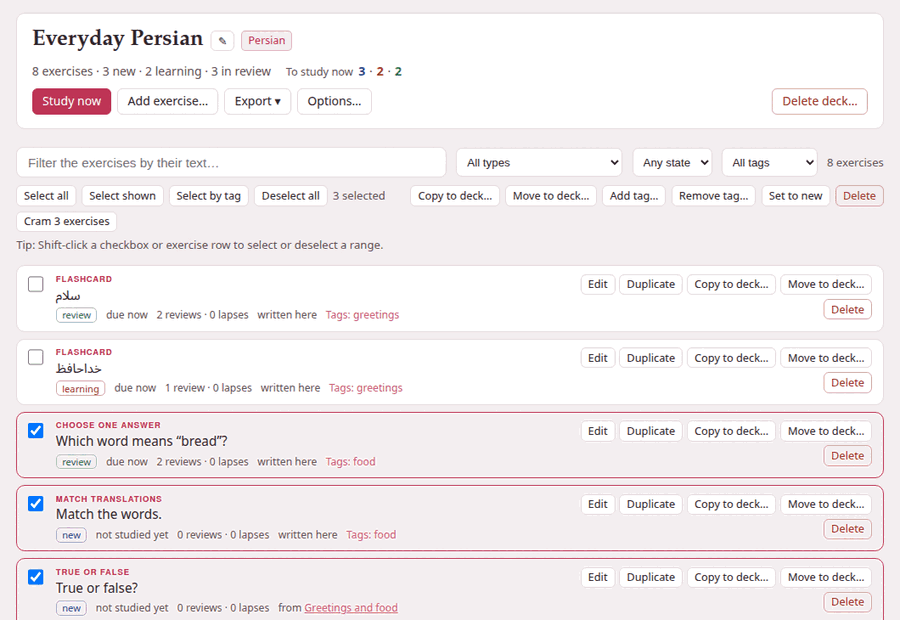
1. The deck’s head#
- The name
- , with ✎ beside it to rename the deck, and the deck’s language.
- The counts
- :
8 exercises · 3 new · 2 learning · 3 in review— every exercise the deck holds, by where it stands (learning counts the ones relearning after a lapse too). - To study now
- , the same three coloured numbers as on the decks page — or, when nothing is due, when the next exercise is.
And its buttons:
| Button | What it does |
|---|---|
| Study now | Studies what is due. Dimmed when nothing is. |
| Add exercise… | The exercise form, to write an exercise straight into the deck (more). |
| Export ▾ | With scheduling or Without scheduling: the deck as a zip (more). |
| Options… | Daily limits, learning steps and intervals: Deck options. |
| Delete deck… | Moves the deck to exercises/.trash/, after asking. |
← All decks in the top bar goes back to the decks page. At the bar’s right end, ◐ turns the colours and ⚙ page opens the page’s panel — the text sizes, the exercise switches Hide transliterations and Drag to answer, the zoom (The ⚙ settings of a page).
Renaming a deck#
✎ asks for the new name — Only the name changes: the deck’s address, exercises and scheduling stay. The deck’s address is made from its first name and never changes, so a bookmark of the deck, or of its study page, keeps working after a rename.
Deleting a deck#
Delete deck… says what will happen before it happens: Its 8 exercises and their scheduling are moved to exercises/.trash/ in the Parseh folder, not erased: move the folder back to restore the deck. Delete deck does it and takes you back to the decks page. In the trash the deck’s folder is named after its language, its address and the moment it was deleted — persian--everyday-persian--20260921-143012 — and moving it back to exercises/persian/everyday-persian restores it whole.
2. The list#
Each exercise is a row, in the order they were added:
- What kind it is
- — Flashcard, Choose one answer, Match translations … — and, for one that no longer works, a red needs attention; point at it to read why.
- Its opening words
- : the prompt, a card’s front, or the first answer.
- Where it stands
- :
new,learning,relearningorreview, then when it is due —not studied yet,due now,due in 7m,due tomorrow,due in 4d. - Its history
- :
2 reviews · 0 lapses— how many times you answered it, and how many times you forgot it once it was a review. - Where it came from
- : from and the document it was copied from, linked (or the note beside a book or a video); from and the book or the video a card was made in, with the place — its link opens the reader at that paragraph, or the player at that second; written here for an exercise added on this page; and a copy made with Duplicate says so, (a duplicate).
- Its tags
- :
Tags: food, lesson-1. - Whether it is one side of a pair
- : a flashcard added as Both (repeat) goes in as two cards, and each row says
↔ linked · front firstor↔ linked · back first— the two rows read alike, and this is what tells them apart. See A card with another side.
Click a row to see the exercise drawn solved under it — the right answers marked, the explanations shown, a flashcard’s front and back side by side; click it again to close it. Several can be open at once. The buttons, the links and the checkbox of a row keep their own clicks, and Shift with a click selects instead (see Selecting many exercises).
3. Finding exercises: the filters#
The bar above the list narrows it:
| Filter | What it keeps |
|---|---|
| Filter the exercises by their text… | exercises whose text or markdown holds what you type, whatever its case |
| All types | one kind of exercise; each kind is listed with how many there are, Flashcard (2) |
| Any state | New, Learning (relearning included), Review, or Due now: the reviews and learning steps due at this moment |
| All tags | the exercises with one tag, food (4) |
| Sources | one or more places the exercises came from: a markdown document, a book, a video, or Written here; every checkbox says how many matching exercises it has |
They work together, and the count at the end of the bar says how many rows are left: 3 of 8, or 8 exercises with no filter on. When nothing matches, the list says No exercise matches these filters.
Open Sources to tick any number of sources. Ticked sources are alternatives to one another, while the source result is still combined with the text, type, state and tag filters. Its choices and counts follow those other filters, so an unselected source with no matching exercise is not shown. A checked source stays at 0 until you untick it, rather than silently turning that part of the filter off. A document source keeps the name saved on its exercises, so it is still useful if that document is renamed or later removed.
Due now leaves out the new exercises (they are under New); a review counts as due for the whole of the day it falls on, and a learning step from the minute it falls due. An exercise whose markdown is no longer an exercise at all is listed under the type Unreadable.
4. Each exercise’s own buttons#
| Button | What it does |
|---|---|
| Edit | Opens the exercise in the form, as the editor does; Save exercise saves it. On one side of a pair it may ask about the other (below). |
| Duplicate | Adds a copy of it, which starts as new: Duplicated: the copy starts as new. The copy is linked with nothing, whatever the original is. |
| Copy to deck… | Copies it into another deck of the same language (more). |
| Move to deck… | Moves it there, with its schedule. |
| Delete | Removes it, and its history, for good. On one side of a pair it asks about the other (below). |
Edit keeps the schedule. Correcting a typo does not make an exercise new again, and does not change where it came from: the schedule belongs to you, not to the words. An exercise the form cannot show — one that needs attention, say — opens as its markdown instead (Edit the exercise as markdown), so it can still be put right from here. If the edited exercise names a picture or a recording the deck does not have, it is saved all the same, and the message says which file is missing.
Delete asks first — “Match the words.” and its scheduling (1 review) leave the deck for good — and then Delete exercise. Unlike a deck, a deleted exercise does not go to the trash.
5. A card with another side#
A flashcard whose Which side appears first is Both (repeat) goes into a deck as two cards: one that shows the front first and one that shows the back first, so each direction is learned and scheduled on its own. The two are linked, and Browse marks both rows (↔ linked · front first, ↔ linked · back first). The front-first card is listed before the back-first one.
Linking has one rule: you are asked before a change or a deletion leaves the other side as it was. Saving a change to one of the two puts this question over the form:
- Change both cards
- writes the change to the other side too. Each card keeps the side it shows first, and neither one’s schedule is touched.
- Change only this one (unlink them)
- changes this card alone, and the two are linked no more.
- Cancel
- leaves both as they were, and the form stays open.
Delete asks the same way — Delete both, Delete only this (the other stays, unlinked) or Cancel — and so does Delete on a selection that holds one side of a pair without the other. A save that changes nothing — the same words, written differently — asks nothing, and neither does a change to a card that has no other side.
A few things are never shared between the two: tags, schedules and Set to new are each card’s own, and the side a card shows first is what makes the pair, so in the form of one of two linked cards that choice is fixed (This card is one side of a pair: its side is fixed.); unlink them with Change only this one, and it can be changed. Both (repeat) is how a card is added, so it is not offered when editing a card that is already in the deck; Both (random), which draws a face each time the card comes up, can be chosen there.
6. An empty deck#
A deck with no exercises says how to fill one: Add exercise… above, or + Deck beside an exercise on a studio document in the deck’s language; the readers of books and the players of videos add the cards made there, with their recordings.