Flashcards
A flashcard is a card with a front and a back, turned by a click. It is the one exercise that is not scored: the learner turns it and judges for themselves, and Check exercises leaves it out of the page’s score. It comes in three kinds, set by card-type::
card-type: | The card | Needs |
|---|---|---|
vocab (the default) | a word, its reading and transliteration; its meaning, an example, notes | target (or front) |
opposites | a word; its opposite | target and opposite |
jolly | two free fields a side, holding anything a page holds | one field on each side |
:::exercise flashcardcard-type: vocab | opposites | jolly…the card's fields…direction: forward | reverse | both-random | both-repeat (optional):::A card has no rows: a line starting with - is refused, and a list goes inside a field instead. Nor does it take the question’s picture and recording (image:, audio:) — a card’s pictures and recordings are its sides’ own, below. It may take a prompt:, drawn above the card, although the form offers none.
1. Vocabulary cards#
| Side | Field | What it holds |
|---|---|---|
| front | target | the word or expression — the card’s main text |
| front | reading | its reading, as kana for a Japanese word |
| front | transliteration | its transliteration |
| front | front-image, front-audio | a picture and a recording |
| back | meaning | its meaning — the back’s main text |
| answer | context | an example, or the context it was met in |
| answer | notes | anything else |
| answer | source | where it comes from |
| back | back-image, back-audio | a picture and a recording |
| front | front | a custom front, which replaces target, reading and transliteration |
| back | back | a custom back, which replaces meaning, context, notes and source |
On each side the picture comes first, then the recording, then the text. The answer is the side the card turns to, so context, notes and source are on the back of a card that shows its front first, and on the front of a card that shows its back first — where the example, the notes and the source go says why, and how to change it.
target: ja:::exercise flashcardcard-type: vocabtarget: 家reading: いえtransliteration: iemeaning: house, homecontext: これは私の家です。notes: Also read うち *uchi*, one's own home.front-image: images/starter-house.svg:::
A card with a transliteration shows Hide transliterations in its head. Pressing it hides the transliteration fields of every exercise flashcard in view — in documents, in a deck’s list, on the study page — and the button becomes Show transliterations; the choice is remembered across pages in that browser. The same switch is Hide transliterations in the ⚙ panel’s Exercises group. Readings and the other fields stay.
front: and back: make a card of any two texts, while keeping the card’s pictures and recordings:
target: es:::exercise flashcardcard-type: vocabfront: [la campana]{tl}front-audio: audio/starter-chime.mp3back: *a bell*, and the sound it makes:::2. Opposites cards#
| Side | Fields |
|---|---|
| front | target, reading, transliteration, front-image, front-audio |
| back | opposite, opposite-reading, opposite-transliteration, back-image, back-audio |
| answer | notes, source |
target: ar:::exercise flashcardcard-type: oppositestarget: كبيرtransliteration: kabīropposite: صغيرopposite-transliteration: ṣaghīrnotes: *big* and *small*direction: reverse:::This card shows صغير first: direction: reverse has turned it round, and its notes are on the other side, with the word, which is the answer.
3. Jolly cards#
A Jolly card has four free fields, two a side — front-primary, front-secondary, back-primary, back-secondary — and each side needs one of its two. A field holds anything a page holds, drawn the way the page draws it: paragraphs, lists, tables, > boxes, ### headings, lemma headings, target-language blocks with their direction, face, tint and vertical setting, Latin blocks with their width and side, pictures, recordings, videos, glosses, colour and reading marks, and footnotes.
A field may be written three ways:
- On one line.
front-primary: 苹果.- As a block.
back-secondary: |, then its lines, each indented under it (two spaces), blank lines included — what the form writes.- Simply going on.
- The lines under a field, until the next field or the closing
:::, belong to it. A line that begins with a word and a colon (note: …) is the next field, and a line starting with-ends the field too (it would be a row, which a card refuses): write a list in a|block.
A field that is one paragraph is a line of text at the card’s own size and in its place, and keeps its line breaks — each line of it is a line on the card. A field of several blocks — a second paragraph after a blank line, a table, a list, a box — takes the card’s width at the page’s text size, and there, as everywhere in the dialect, the lines of a paragraph join: write ⏎ to break one.
target: zh:::exercise flashcardcard-type: jollyfront-primary: | {width=35 align=center}front-secondary: What is it called in Chinese?back-primary: 苹果back-primary-size: 200back-secondary: | *píngguǒ*, an apple | 汉字 | pinyin | meaning | |---|---|---| | 苹果 | píngguǒ | apple | | 吃 | chī | to eat | [我每天吃一个苹果。]{tl bg=rose} {width=60 align=center}back-secondary-shade: muted:::
苹果
píngguǒ, an apple
| 汉字 | pinyin | meaning |
|---|---|---|
| 苹果 | píngguǒ | apple |
| 吃 | chī | to eat |
我每天吃一个苹果。
target: hi:::exercise flashcardcard-type: jollyfront-primary: नमस्तेfront-primary-size: 180front-secondary: When is it said,and how is it answered?back-primary: *namaste*: on meeting and on leavingback-secondary: It is answered with नमस्ते too,often with the palms joined.:::नमस्ते
and how is it answered?
often with the palms joined.
A few things a card does differently from a page, each for a reason:
- A heading on a card
- is not numbered and is not in the page’s contents: it is a label on the card.
- A footnote written on a card
- is one of the document’s notes, and a front field may cite a note written at the card’s end.
- A recording on a card
- is an ordinary player: a click on it plays it and does not turn the card.
- A picture, recording or video on a card
- has no layout panel in the studio, so its size and place are written by hand,
{width=… align=…}. - A field drawn as blocks
- is not offered to the studio’s hover tools — no colour palette, no transliteration cloud, no editor on its target or Latin blocks. A field that is one paragraph keeps them.
- A field cannot hold an exercise.
- And a line that is only
:::ends the exercise, however far it is indented — so a formula on a card is written in a line,[…]{math}, not as a:::mathblock. A LaTeX drawing may stand in a field: its fence has four colons,::::latex…::::, and does not end the exercise. front-imageand the other picture and recording fields- belong to the other two kinds; a Jolly card ignores them. Put a picture or a recording in a field, as a line of its own.
4. Size and shade#
Every text field of every kind takes two more fields named after it: <field>-size, a percentage of the surrounding text from 50 to 250, and <field>-shade, its colour:
-shade | The text is |
|---|---|
primary | in the page’s ink |
subdued | grey |
muted | a paler grey |
accent | in the accent colour |
#RRGGBB | in that colour |
The main fields — target, meaning, opposite, front, back, front-primary, back-primary — start at 120 and primary; the others at 88 and subdued. A size outside 50–250 is taken as 50 or 250, whichever is nearer, and one that is not a number leaves the field at its own size; a shade the card does not know is the page’s ink. Both hold on paper too (On paper), where black and white prints every shade black. The three fields that go with the answer — context, notes and source — take a third, <field>-side, which is not about looks: it says which side they go on.
In the form, every text field has Text appearance under it: Text size (%), and Color treatment — Primary text, Subdued, Muted, Accent color, or Custom color with a colour picker. The form refuses a size outside 50–250, and writes a size or a shade into the Markdown only when it differs from the field’s own. Under Example or context, Notes and Source the same fold holds a box of another kind, Show on the side shown first (below).
5. Pictures and recordings#
On a vocabulary or opposites card, front-image and back-image name a picture under images/, and front-audio and back-audio a recording under audio/ (MP3, M4A, AAC, Ogg, Opus, WAV, FLAC or WebM; any other value is an error). A card’s recording is a 🔊 button: a click plays it, a second click stops it, and it never turns the card; only one card’s recording plays at a time. On a Jolly card, write the picture or the recording as a line in a field — {width=40 align=center},  — where a recording is a player with its controls.
In the form, a picture or recording field has Upload…, which stores the file in the document’s own images/ or audio/ and fills in the path, and a recording field has ▶ to hear it; a Jolly field has Image… and Recording…, which upload a file and put its line into the field at the cursor. The document must have been saved once before anything can be uploaded into it.
6. Which side comes first#
direction: says which side the card shows first, and whether a deck asks the other side too. In the form it is Which side appears first:
direction: | In the form | The card |
|---|---|---|
forward (the default) | Front | shows the front first |
reverse | Back | shows the back first: the word from its meaning, where the front is the word; its example, notes and source are on the front, with the word (they go with the answer) |
both-random | Both (random) | shows the front or the back first, drawn afresh each time the card is shown |
both-repeat | Both (repeat) | shows the front first, and in a deck is asked from both sides |
The value is read in any case (Both-Repeat is both-repeat); a card whose direction: is anything else shows Exercise needs attention and the line direction must be forward, reverse, both-random or both-repeat.
- Both (random).
- The page decides when the card is drawn, not when the document is saved: every time a page with the card opens, and every time a practice brings the card up, the front or the back is first, half the time each. It works the same in a document, on the study page, in a cram, on a phone’s study pack and in an exported page, and the turning, the recordings that play when a side appears and ⤢ Enlarge all follow the side that came first, and so do the example, the notes and the source, which the draw puts on the side it did not show first. The editor’s preview shows both sides at once, so it draws nothing.
- Both (repeat).
- The card is drawn front first, as
forward, and the exercise’s head says so in small grey type, right after the magenta FLASHCARD: When exported to a deck, both sides will be asked. The line is above the card and not on it, so it never touches what the card says, and a click on it does not turn the card. Where the head is too narrow to hold it beside FLASHCARD and the buttons — on a phone, in the editor’s preview — it has a line of its own under them. It is in the studio’s own drawings of the card: a document’s page, on a computer or a phone, the editor’s preview and this guide. It is not in an exported web page, which has no deck to export to, nor on paper, nor in a deck.
target: ar:::exercise flashcardcard-type: vocabtarget: كتابtransliteration: kitābmeaning: a bookdirection: both-repeat:::In a deck the two are kept as they say, and what is kept is a snapshot taken when the card is added. A card put into a deck with both-random is one card of the deck, and the study page and the cram draw which side comes first each time it is asked. A card put into a deck with both-repeat becomes two cards, one that shows the front first and one that shows the back first, each scheduled and rated on its own — and the deck keeps the two linked. When you edit or delete one of the two, the deck asks whether to do the same to both (they stay linked, or both are deleted) or to unlink them and change only the one. A card sheet in a book or a video writes ⇄ both as both-repeat; where the card goes has the sheet.
Because a deck’s card is a snapshot, editing the card in the document afterwards never changes the deck’s cards, nor the deck’s the document’s: they are copies of each other from the moment of adding, and a change is made in the place that holds the card.
A bidirectional: field, which older card sheets wrote, is kept as it is and changes nothing here.
7. Where the example, the notes and the source go#
On a vocabulary card context, notes and source — on an opposites card notes and source — go on the side the card turns to, the answer: the side that is not shown first. A card that shows its front first has them on its back, with the meaning. A card turned round opens on its meaning alone, so that an example, the notes or the source never give the word away on the side that asks for it, and turns to the word, its reading and its transliteration, and under them the example, the notes and the source, in that order and each at its own size and shade.
direction: | Shown first | The example, notes and source are on |
|---|---|---|
forward (the default), both-repeat | the front, the word | the back, with the meaning |
reverse | the back, the meaning | the front, with the word |
both-random | either, drawn each time | the side the draw does not show first |
context-side, notes-side and source-side say otherwise for one field each. Two values: answer — the side the card turns to, which is what a field does when it says nothing — and question, the side shown first:
target: en:::exercise flashcardcard-type: vocabtarget: [bank]{tl}meaning: the sloping side of a rivercontext: She sat on the river bank.context-side: question:::Here the sentence is on the side that asks, a cue to the word’s sense, and the meaning alone is on the answer. A card turned round gives its example, notes and source to the word:
target: de:::exercise flashcardcard-type: vocabtarget: [das Eichhörnchen]{tl}meaning: squirrelcontext: [Im Herbst sammelt es Nüsse.]{tl}notes: Neuter, as its ending *-chen* says.direction: reverse:::Click it: the card opens on squirrel, and the word, the example and the notes are on the other side.
- Relative, not fixed.
answerandquestionmean the same on every card, whateverdirection:says, which is why they are notfrontandback. Sayquestionon all three of a card turned round and it is drawn as such cards always were.- Each in its place.
- The side that receives them puts them after its own fields — the main text, the reading, the transliteration, or the meaning — as
context,notes,source, whichever of them are there. The pictures and recordings stay on the side that names them (front-image,back-audio). - Both (random).
- The card is drawn first, and the page moves the three with the draw, so that the ones that say
answerare always on the side that was not shown first. The same on the study page, in a cram and in an exported page. - In a deck.
- A card put in with Both (repeat) becomes two cards, and each follows its own direction: the example, notes and source of the one that shows the front first are on its back, and of the one that shows the back first on its front. A
-sideline is copied to both. - A custom front, a custom back.
back:replaces the meaning, the example, the notes and the source, so none of the three is drawn on either side, whatever a-sidesays.front:replaces only the word and its reading, so they stay and follow it.- A Jolly card
- has no such fields: its four fields are said where they stand, and a
-sideon it does nothing. Nor doescontext-sideon an opposites card, which has nocontext. - A value that is neither
- shows Exercise needs attention and
notes-side must be answer or question(orcontext-side, orsource-side), on any kind of card. It is read in any case,Questionasquestion. - Cards written before.
- A card that shows its front first looks as it did. A card turned round that has an example, notes or a source now has them with the word;
questionon each puts them back.
In the form, a box under each of Example or context, Notes and Source, in the fold called Text appearance — shut, like the size and the colour — Show on the side shown first writes the line notes-side: question, and nothing when it is not ticked. The form’s preview moves the field as the box is ticked. An opposites card has the box under Notes and Source only, and a Jolly card none.
8. In the form#
The grid has one tile per kind: Embedded vocabulary flashcard, Embedded opposites flashcard and Embedded Jolly flashcard. The form’s Card content has a box for each field, named for what it holds: Word or expression, Reading, Transliteration, Meaning, Example or context, Notes, Source, Custom front (replaces the word fields), Custom back (replaces the meaning fields), Front image path and the rest on a vocabulary card; Opposite, Opposite reading and Opposite transliteration on an opposites card; Front — primary text to Back — secondary text on a Jolly card, each a box of several lines that takes any studio Markdown. Then Which side appears first: Front, Back, Both (random) or Both (repeat). A card has no prompt, pictures of the question or explanations in the form.
9. On the page#
A click anywhere on the card turns it — except on something that does its own thing there: a player, a link, a button (the 🔊 among them), a footnote’s mark or its cloud. Enter or Space turns a card that has the focus, and turning a card stops whatever was playing on the side that goes out of sight. The editor’s preview shows both sides at once.
⤢ Enlarge, in the head of every card, opens the same card, only bigger, in a window over the page: laid out exactly as on the page — its width, its text size, the page’s typography (the ⚙ panel’s Text group) and the exercise’s direction, every line breaking where it breaks there — and then magnified as much as the window holds, at least half as large again where the screen has room; a card taller than the window is drawn that large and scrolls.
On a phone, where the card already fills the width, it is laid out a little narrower and magnified to the window’s width, as much as the window’s height holds, up to twice as large — but never so narrow that a picture or a player comes out smaller beside the words than on the page, or that a line breaks that is whole on the page: a field, a paragraph or a line of a Jolly field that is one line on the page is one line enlarged, and only a paragraph that already wraps there may wrap at other words. Where that would make the card hardly larger than magnifying it whole — less than a tenth — it is magnified whole instead, every line as on the page. A card too tall for the window at any width, like a long dialogue, is magnified whole, as far as the window’s width allows (a third larger or so), and scrolls.
A click on the enlarged card, Space or Enter turns it — and the card on the page with it; Escape or ✕ closes the window.
10. On paper#
A card prints as a card to cut out and fold: a frame with round corners, the card’s front in its left half and its back in the right, and a dashed line exactly between the two. Cut along the frame — the ✂ on it says so — and fold on the dashed line, the print outside: the halves are back to back, a card in the hand with the front on one face and the back on the other, both the right way up. It is the one exercise whose answer is on the paper.
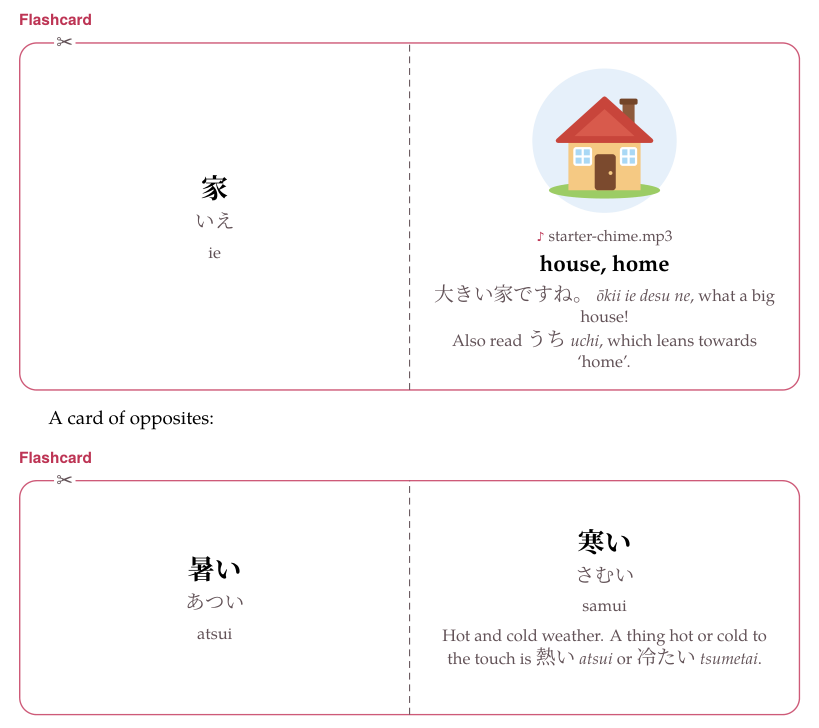
- Each half holds its side as the page draws it. The picture first, then the recording, then the fields, one under another in the middle of the half: the main field bold and larger, the others smaller and grey, each at its own
-sizeand in its own-shade— in black and white, every shade is black. A recording cannot be played from paper, so it is ♪ and its file’s name. - A vocabulary card prints every field it shows on the page, each where the page puts it:
target(orfront) with its reading and transliteration,meaning(orback), and the context, notes and source on the answer’s half — and its pictures. An opposites card prints the word and its opposite, with their readings, transliterations, notes and source. - A Jolly field of one paragraph is a line of its own in the middle of its half; a field of blocks — a table, a list, a box, a picture — is laid out from the start of the line, at the page’s size, and a table too wide for its half is made to fit it.
direction: reverseturns the card round on paper too. The side the card shows first is the left half, so the meaning is alone on it and the example, notes and source are in the right half, with the word.both-randomandboth-repeatprint asforward, the front in the left half and the example, notes and source in the right, and the paper says nothing of decks.- Nothing crosses the fold, at any print size: a long word is hyphenated inside its half, a phrase of the target language wraps, and what cannot break is set smaller until it fits.
- The card is as tall as its taller side, and never less than three fifths of a half’s width, the shape of an index card; its label and its prompt stand above the frame. A card is never split between two pages, which could not be folded: one taller than a page — a Jolly card holding a table, a list and a picture, in large print — is printed smaller, whole, on one page.
11. Where cards come from#
Besides the form and the Markdown:
- From a book or a video.
- A modifier-click on a word in the book reader or the video player opens a card sheet; its exercise deck destination adds the word to a deck as a vocabulary, opposites or Jolly card — with a recording cut from the book’s narration or the video, and a frame of the video as its picture — and its markdown destination copies the same card, to paste into a document with Paste markdown… (or Ctrl+V on the form’s grid).
- From a document’s glosses.
- + Add all exercises, on a document’s reading view, has Show gloss flashcards, which offers every
word = *gloss*of the document as a vocabulary card, readings and transliterations included.
12. In a deck#
On the study page a card is turned with Show answer, Enter, or a click — on the enlarged card too — and then rated Again, Hard, Good or Easy: nothing checks a card for you. It plays its recordings as Anki plays a card’s sound: when the card appears, the first recording on its front plays once, and when it is turned, the first on its back — a front-audio or back-audio field or a recording line in a Jolly field, whichever comes first on that side, and only its clip when it has one. Exercises in a deck has the rest.