Levels and their names
Each subparagraph of a book is set several times over, one after the other, and each setting is a level. Which levels there are depends on the language. The header of the reader has one button for each, named for what it shows — With vowels, Chunks, Plain, Nastaliq in a Persian book — under the word levels. There are no numbers on them anywhere: not on the buttons, not in the panel, not in what pointing at one says.
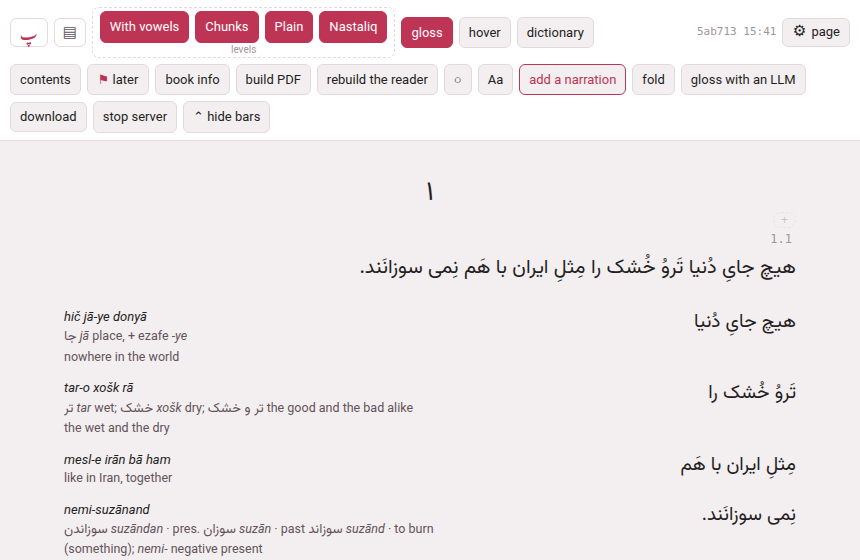
A level is one of a few kinds, and the kind is what a name is kept against: the sentence on its own, the chunks with their glosses, the sentence as it is ordinarily printed, the sentence in another face, and — Japanese and Chinese — the reading alone. Level 1 is your own attempt at the sentence, before any help arrives; the chunks level is the help; the others give the sentence again, as it is really printed, in its other face, or as it is read aloud.
1. What each language calls them#
These are the names a book has until you change them, and the sentence the panel prints under each (The ⚙ settings of a page). They come from Parseh’s language registry, so a language you add brings its own (Adding a language).
| Language | The level | What it shows |
|---|---|---|
| Persian | With vowels | the sentence with its vowels, to read on its own |
| Chunks | the sentence cut into chunks, each with its gloss beside it | |
| Plain | the sentence as Persian is ordinarily printed, with no marks | |
| Nastaliq | the same sentence in nastaliq script | |
| Arabic | With vowels | the sentence with its vowels, to read on its own |
| Chunks | the sentence cut into chunks, each with its gloss beside it | |
| Plain | the sentence as Arabic is ordinarily printed, with no marks | |
| Italian, French, German, Turkish, English, Hindi, Spanish | Sentence | the sentence, to read on its own |
| Chunks | the sentence cut into chunks, each with its gloss beside it | |
| Japanese | Furigana | with furigana over each word |
| Kana only | the reading alone, in kana | |
| Chunks | the sentence cut into chunks, each with its gloss beside it | |
| Plain | plain, as Japanese is written | |
| Vertical | the sentence in vertical columns (tategaki) | |
| Chinese | Pinyin | with pinyin over each word |
| Pinyin only | the reading alone, in pinyin | |
| Chunks | the sentence cut into chunks, each with its gloss beside it | |
| Plain | plain, as Chinese is written | |
| Vertical | the sentence in vertical columns (tategaki) |
The buttons come in the order of the table. In Persian and Arabic the first level has the vowel marks, the third has none and is not a hovering text — there is no cloud on it, so it is the sentence as a printed page has it.
2. Hiding a level#
Press a level’s button to show or hide it — the level goes and comes back, and the rest of the page closes up. Or open the panel, ⚙ page → Levels & reading → Levels, and tick or untick it there; the two are one switch. What you choose is kept on this device, for every book: turn everything off but the sentence to read it alone, or leave only the chunks to work through the glosses. The choice is made for a kind of level, so hiding Plain hides it in every book that has one.
While hover is on, the levels it takes over rest — the chunks, the other face, the vertical one — and the panel says so under the row: Hover mode shows the glosses in the cloud instead. (The reader.)
3. Renaming a level#
The panel’s Levels row is one line per level: the tick, a field with the level’s name in it, and under it what the level shows.
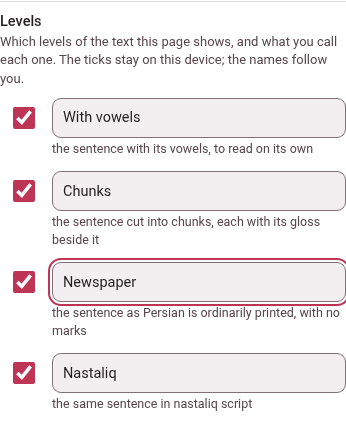
Type a new name in the field and the button on the page has it a moment later, and so does its tooltip, and so does the sentence hover mode’s own tooltip says (the text alone (the levels With vowels and Newspaper)…). The rules:
- Twelve characters at most
- , on one line — what a button holds. A name that is too long is cut as it is typed.
- Empty is the default.
- Clear the field, or type the default name itself, and the level goes back to the name in the table above.
- A name is for a language.
- Plain in Persian and Plain in Arabic are two names, so you can call one Newspaper and leave the other. A book in that language wears it, whichever book it is.
- It follows you.
- A name is a word you chose, not a way a screen is set up, so it is kept by the computer and every device you read on wears it: rename a level on the phone and the computer’s reader has it the next time it loads.
- It works in every reader
- , however long ago the book was built: the names are put on the page when it opens, with no rebuilding.
4. Diacritics#
A Persian or Arabic sentence can be written with the small marks above and below the letters that say the vowels, a doubled consonant and a stop. A reader who knows the word does not need them, and a page full of them is hard to look at. Diacritics puts them away — in the reader, where it is ⚙ page → Levels & reading → Diacritics, and in a video’s own panel, Watching & reading → Diacritics — and puts them back.


- Which marks.
- Exactly the ones the third level has never had, and that the lookups fold away: in Persian the eight of U+064B to U+0652 — fathatan, dammatan, kasratan, fatha, damma, kasra, shadda (the doubling) and sukun (the silent stop); in Arabic the same eight and the superscript alef (U+0670). One rule, whichever level or video. No letter, hamza or madda is touched.
- Which levels.
- The first and the second — With vowels and Chunks — in a book; the lines of the transcript in a video. The third level, Plain, is as it ever was: no marks at all, as the language is ordinarily printed, with no cloud. Diacritics does not change that level, and it is not the same thing as it: with Diacritics off you still have the first level, its words still open their cloud when you point at them, the chunk’s gloss in it — the third level is the same text without the hover.
- Display only.
- The marks are put away from the screen and from nowhere else. The book’s files, the search, the lookups, the cards, the printed PDF and a bundle are exactly as they were. Selecting text with the mouse and copying it gives what is drawn, without the marks; but Shift-click, the cloud’s copy button, a card and the chunk editor give the book’s own text, with its marks, and so does the search — a card made from a chunk with the marks put away carries the vowelled text.
- Chapters that come later.
- A book of several chapters brings them as they are wanted; a chapter that arrives after you turned the marks off arrives without them.
- A video
- has the switch only if the video’s lines hold marks — a Persian video whose captions are written without any has nothing to put away, and no row. The lines, the cloud and the colours work as before; copying, cards, the editor and every lookup keep the phrase as it was written.
- On this device.
- The switch is kept on this device, and the marks are shown to begin with. It is in the panel only — a language with no such marks (Italian, Japanese…) has no row.